DeepSeek V4.1 Flash 1017: Benchmarks, Pricing, and API Guide
Explore 11 official DeepSeek V4.1 Flash 1017 benchmarks, its 1M context and 384K output, peak and off-peak pricing, and a copyable PicoX API example.
 PicoX TeamPublished
What is DeepSeek V4.1 Flash 1017, and is it worth an upgrade? Released on October 17, 2026, this V4.1 Flash update accepts text and images, offers a million-token context window, and supports up to 384K output tokens. The main improvements target coding and agent tasks, while the official API calling convention and unit prices remain unchanged. This guide walks through 11 official benchmarks, peak and off-peak cost examples, and a copyable API request to help you judge where it fits your workflow.
This article covers official information available as of October 18, 2026. The benchmark results were published by DeepSeek; PicoX redrew the charts from those figures and did not independently run these evaluations. Official release notes.
Three things to know about the 1017 update
- Higher coding scores: in the same official comparison table, Terminal-Bench 4.0 rises from 31.2 to 42.3, and ProgramBench from 20.3 to 29.1. Those are gains of 11.1 and 8.8 score points; they do not imply the same improvement on every coding task.
- Long context and image input: a million-token context window and up to 384K output tokens leave room for long documents, repositories, and screenshot analysis. Output remains text.
- Unchanged unit prices: peak hours, off-peak hours, and cache hits still matter. The cost of completing a task also depends on how many tokens and retries it takes.
The benchmark comparison uses a pinned version of the official 1017 model card. Specifications and prices come from DeepSeek’s model and pricing documentation. The evaluation conditions and cost calculations are explained below.
1. What changed in DeepSeek V4.1 Flash 1017?
The 1017 suffix identifies the October 17 update. DeepSeek updated its website, app, and API together. On DeepSeek’s own API, the model name remains deepseek-flash: a service alias that follows official updates. DeepSeek-V4.1-Flash-1017 identifies a particular release, so the two names serve different purposes.
The published evaluation results put the emphasis on coding, tool use, and agent tasks involving visual input. The model understands text and images and produces text. Reading screenshots, answering questions about charts, and helping with code based on a user interface are reasonable applications. Image input support does not make it an image generation model.
DeepSeek also reports shorter task runtimes and outputs, along with optimizations for tools such as DeepSeek Harness, CodeBuddy, and WorkBuddy. The announcement does not provide a universal speedup percentage. Any benefit needs to be checked against your prompts, tools, and workload; “faster” cannot be converted into a fixed tokens-per-second or latency guarantee. Release details.
2. Specifications: a million-token context, 384K output, and image input
| Item | Details |
|---|---|
| Model release | DeepSeek-V4.1-Flash-1017 |
| Official API model name | deepseek-flash |
| PicoX model ID | deepseek/deepseek-v4.1-flash-1017 |
| Input / output | Text and image input; text output |
| Context window | Officially described as 1M tokens; configured as 1,048,576 tokens in the PicoX catalog |
| Maximum output | 384K, or 393,216 tokens; also subject to the remaining context capacity and request settings |
| Reasoning controls | Thinking and non-thinking modes; the official default enables thinking at high effort |
| Common capabilities | Streaming, tool calls, JSON output, and image understanding |
| Official interfaces | Chat Completions, Responses, and an Anthropic-compatible interface |
| Weights license | The official 1017 weights repository lists the MIT license |
Sources: official model specifications, Chat Completions parameters, and the 1017 model repository. The PicoX model ID and catalog settings are listed on the model detail page.
A large context limit is useful headroom, not a target to fill on every request. For repository questions, finding the relevant files and then adding their dependencies usually makes the answer easier to check than uploading everything at once. A million-token window makes complex tasks possible, but it does not remove noise, outdated files, or contradictory instructions.
Likewise, 384K is an output ceiling, not the default response length. In the official Chat Completions documentation, omitting max_tokens gives a default of 8K in non-thinking mode, 64K in thinking mode, and 128K at max effort. Input and generated content must still fit within the context limit. Other services may impose additional route-specific limits.
3. Architecture: a 552B MoE backbone with 8B / 16B active parameters
The V4.1 Flash technical report describes a multimodal MoE architecture with a 552B-parameter backbone. Its Causal Encoder-Decoder (CED) design activates roughly 8B parameters per token during input prefill and 16B during generation. Total backbone parameters, active input parameters, and active output parameters measure different things and should not be used interchangeably. V4.1 Flash technical report.
The report also describes CSA2 cross-layer KV cache reuse and an FP4 KV cache, reducing the global KV cache to approximately 890 bytes per token. These choices address the compute, memory, and data movement costs of long inputs. That matters for agents that repeatedly read files, tool results, and conversation history.
These are architectural details of the V4.1 Flash family published in September. The 1017 announcement does not include a new technical report recounting all architecture parameters or present these features as new additions. They should not be described as architectural breakthroughs introduced by 1017.
Open weights also do not make a model of this scale practical to deploy in full on an ordinary consumer GPU. Weight formats, inference software, memory, communication, and concurrency all need planning. If the immediate goal is to assess product quality, testing your own tasks through an API can help separate model suitability from infrastructure costs.
4. Benchmarks: all 11 official comparisons with the previous release
The table below uses one comparison table from the official 1017 model card, including the previous V4.1 Flash baseline shown there. Higher scores are better. The change column is a direct subtraction in score points, not a speedup percentage. The benchmarks are not averaged into a single overall score. Official model card and full comparison.
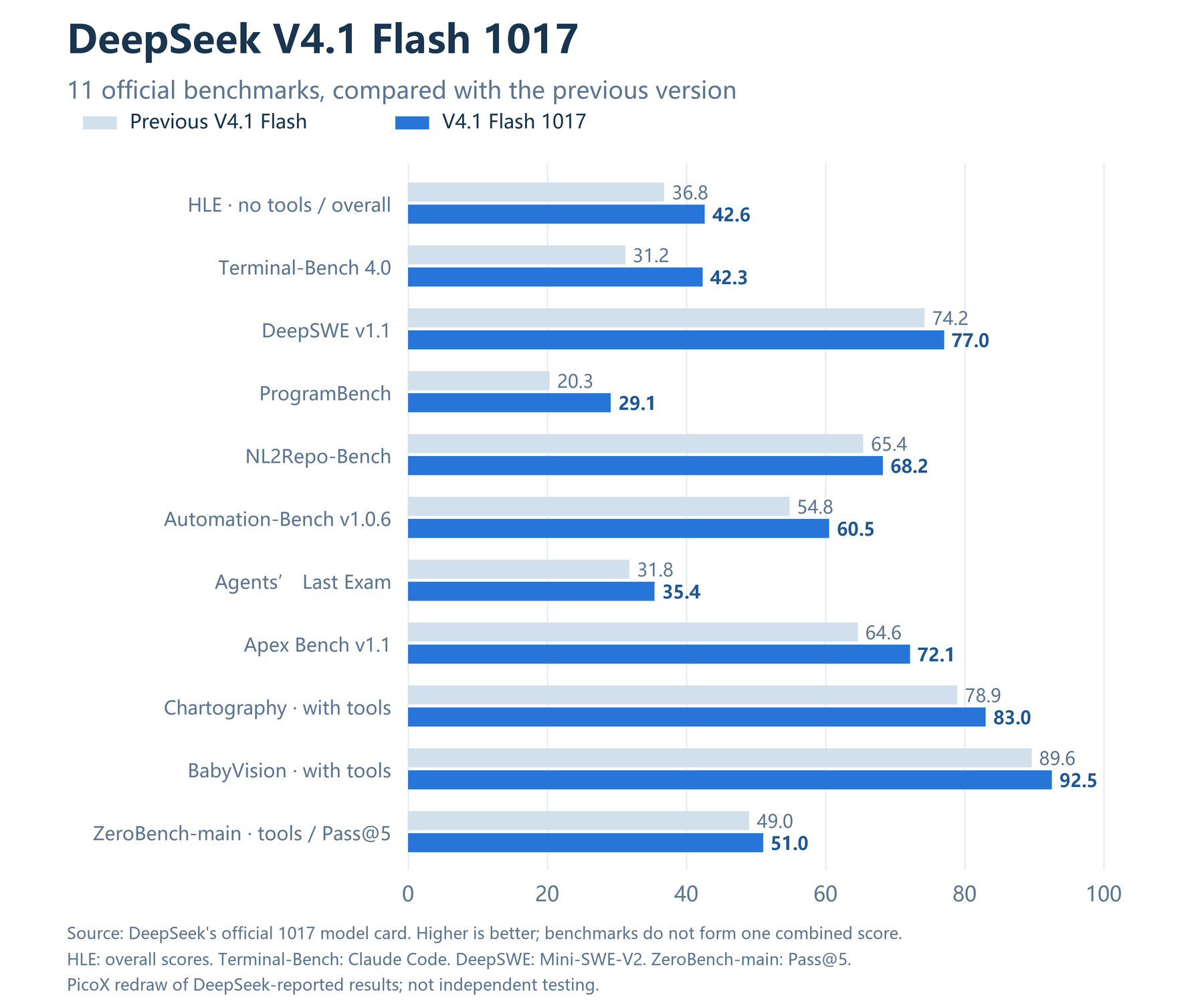
| Benchmark / evaluation scope | Previous V4.1 Flash | V4.1 Flash 1017 | Change in score points |
|---|---|---|---|
| HLE (no tools, overall) | 36.8 | 42.6 | +5.8 |
| Terminal-Bench 4.0 | 31.2 | 42.3 | +11.1 |
| DeepSWE v1.1 | 74.2 | 77.0 | +2.8 |
| ProgramBench | 20.3 | 29.1 | +8.8 |
| NL2Repo-Bench | 65.4 | 68.2 | +2.8 |
| Automation-Bench v1.0.6 | 54.8 | 60.5 | +5.7 |
| Agents’ Last Exam | 31.8 | 35.4 | +3.6 |
| Apex Bench v1.1 | 64.6 | 72.1 | +7.5 |
| Chartography (with tools) | 78.9 | 83.0 | +4.1 |
| BabyVision (with tools) | 89.6 | 92.5 | +2.9 |
| ZeroBench-main (with tools, Pass@5) | 49.0 | 51.0 | +2.0 |
Coding: Terminal-Bench and ProgramBench deserve a closer look
Terminal-Bench 4.0 gains 11.1 score points, the largest increase in this set; ProgramBench gains 8.8. Both are good reasons to test the update in a coding workflow. They do not establish that everyday coding is “35.6% faster” or that every repository task improves by the same amount. Benchmark scores, response speed, merge rates, and human rework are separate measures.
DeepSWE v1.1 and NL2Repo-Bench show smaller positive changes. For a development team, a useful comparison is to give both versions existing bugs, regression tests, and real feature requests under the same tools and budget. Counting lines of code produced in a single demo tells you much less.
Agents and vision: evaluate the whole task
The changes in Automation-Bench, Agents’ Last Exam, and Apex Bench offer reasons to investigate automation workflows. The three vision-related results also improve, but these evaluations explicitly use tools. Their scores reflect the model working within the evaluation process and should not be treated as tool-free visual recognition results.
Keep these evaluation conditions attached to the numbers
- HLE 42.6 and 44.0 are not interchangeable. The main table reports 42.6 overall and 44.0 for the text-only subset; the previous release scores 36.8 and 39.1 respectively. A subset score does not belong in an overall ranking.
- The harness matters. DeepSeek specifies Claude Code for Terminal-Bench 4.0 and Mini-SWE-V2 for DeepSWE. Changing prompts, tool implementations, or execution budgets can change the result.
- ZeroBench-main uses Pass@5. It measures performance with multiple attempts allowed. A score of 51.0 does not mean a single request has a 51% success rate.
- Benchmark versions must stay distinct. Terminal-Bench 2.1, 3.0, and 4.0 are different test versions. Subtracting the older 2.1 score of 90.6 from the 4.0 score of 42.3 would not be a valid comparison.
- Recommended inference settings are not a complete evaluation configuration. Sampling recommendations in a model card do not establish that all 11 evaluations used the same temperature, reasoning effort, context, or token budget.
The harness and Pass@5 notes come from the official release log. We have not relabeled the September GPQA, Codeforces, or MathArena results as 1017 results: the 1017 table does not publish new scores for those evaluations.
Why use 65.4 as the previous NL2Repo score?
Earlier sources contain different baseline figures. This article pairs 65.4 with 1017’s 68.2 because they appear together in the official 1017 comparison table. It avoids combining a baseline from another document with the new result. When reading or reproducing evaluations, retain the version, source table, and harness settings.
Comparisons with other models reveal different strengths
The same official table includes K3, GLM-5.3, GPT-5.6 Sol, and Opus 5. Across the four selected benchmarks below, 1017 has stronger reported results on DeepSWE and Automation-Bench, while its Terminal-Bench 4.0 and ProgramBench scores remain below the listed Opus 5 results. The task should guide the choice; a lead on one test does not establish a lead everywhere. These remain comparisons published by DeepSeek, without an independent rerun by this article, and are not a current ranking of every model’s latest release.
| Benchmark | 1017 | K3 | GLM-5.3 | GPT-5.6 Sol | Opus 5 |
|---|---|---|---|---|---|
| Terminal-Bench 4.0 | 42.3 | 12.6 | 37.9 | 39.9 | 51.8 |
| DeepSWE v1.1 | 77.0 | 67.5 | 66.9 | 73.0 | 74.0 |
| ProgramBench | 29.1 | 17.5 | 19.0 | 23.0 | 37.0 |
| Automation-Bench v1.0.6 | 60.5 | 46.7 | 48.8 | 45.8 | 50.3 |
Source: pinned 1017 model card. The harness and budget limitations discussed above also apply to these comparisons.
5. API pricing: peak hours, off-peak hours, and cache hits
The update keeps the existing official API prices. The table shows DeepSeek’s official USD rates as of the article’s review date, all per million tokens. Peak periods are Monday–Friday, 09:00–12:00 and 14:00–18:00 Beijing time (UTC+8), excluding Chinese statutory holidays. All other periods are off-peak. Official rates and time rules.
| Usage category | Off-peak rate | Peak rate |
|---|---|---|
| Input: cache miss | $0.15 | $0.30 |
| Input: cache hit | $0.003 | $0.006 |
| Output | $0.60 | $1.20 |
Consider a task that uses 1 million input tokens and 100,000 output tokens in total. Assume all requests fall within one pricing period and exclude separately charged tools:
- With no input cache hits: the off-peak cost is
1 × 0.15 + 0.1 × 0.60 = $0.21; the peak cost is$0.42. - With an assumed 80% input cache hit rate: the off-peak cost is
0.2 × 0.15 + 0.8 × 0.003 + 0.1 × 0.60 = $0.0924; the peak cost is$0.1848.
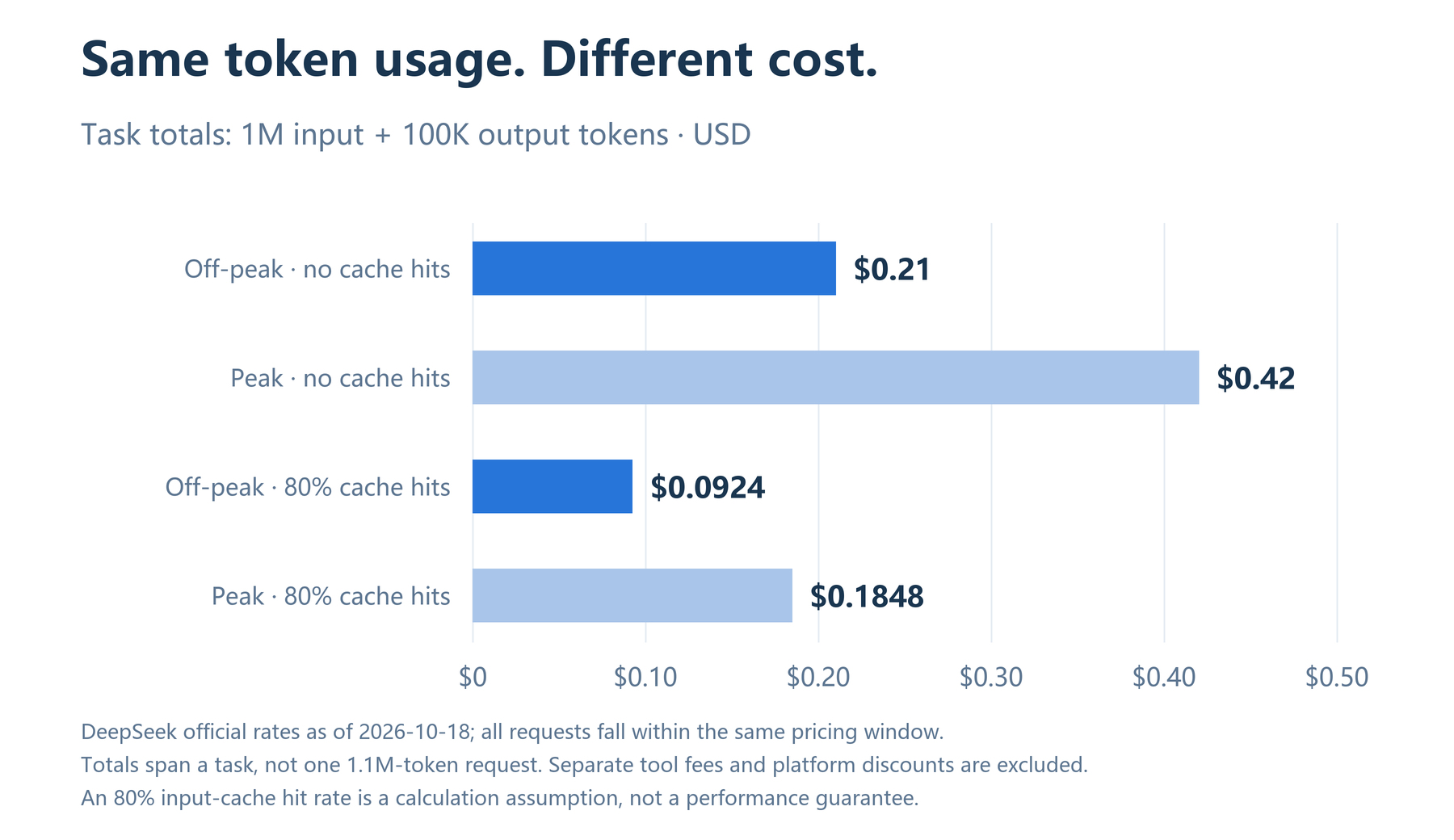
Unchanged unit prices can still produce a different task cost. The same goal may require a different output length or more retries. It is useful to record cost per successfully completed task alongside quality, rather than considering the per-million-token rate alone.
On PicoX, charges can also depend on the selected provider, account discounts, and resource packs. Check the model details and the historical pricing breakdown in your usage records. The table above describes DeepSeek’s standard official API rates. Separate search, fetching, or other tool-service fees are not included in these token-cost examples.
6. API setup: the model ID and a copyable curl request
Create a PicoX API key with access to the model, use https://picox.ai/v1 as the base URL, and set the model to deepseek/deepseek-v4.1-flash-1017. Start with a small request to check access and the response, then add tools, images, or more complex settings. This makes configuration problems easier to isolate.
Here is a streaming Chat Completions request. Set PICOX_API_KEY to your key first; the example uses shell environment-variable syntax.
curl -N https://picox.ai/v1/chat/completions \
  -H "Authorization: Bearer $PICOX_API_KEY" \
  -H "Content-Type: application/json" \
  -d '{
    "model": "deepseek/deepseek-v4.1-flash-1017",
    "messages": [
      {
        "role": "user",
        "content": "Review this function. Explain its edge cases, then suggest a fix and test cases: def average(xs): return sum(xs) / len(xs)"
      }
    ],
    "stream": true,
    "max_tokens": 4096
  }'
A streaming client should consume the complete event stream and handle its final status. A connection heartbeat does not mean the model has produced content. For tool calls, the model supplies the intended call and its arguments; your application or agent framework remains responsible for executing the tool. See the PicoX API documentation for the full integration guide.
Match reasoning effort to the task
The official DeepSeek Chat Completions API supports reasoning_effort: none disables thinking, while low, high, and max select different effort levels. The default is high. Simple extraction is a sensible place to try lower effort; cross-file changes or difficult problems are worth comparing at higher settings. When using PicoX, check the parameters supported by the selected provider route rather than assuming every route behaves identically.
The official documentation also states that temperature has no effect in thinking mode. At the review date, presence_penalty and frequency_penalty are marked unsupported and have no effect if supplied. For Flash, top_p accepts 0.95–1.0 in thinking mode and is fixed at 1.0 in non-thinking mode. Confirm the mode and parameter semantics before testing changes that may actually be equivalent. See the thinking-mode guide and API parameter reference.
Validate image input before expanding the workflow
Officially supported formats include JPEG, PNG, GIF, and WebP. In Chat Completions, images are included in the user message’s content array, typically as image_url blocks. Useful tasks include reading screenshot text, interpreting charts, and analyzing layouts. Check the integration’s documentation for route support, request-size limits, and the number of images allowed. Official vision guide.
7. Where to try it: coding agents, long documents, and visual analysis
| Workflow | Tasks to evaluate | What to watch |
|---|---|---|
| Code maintenance and coding agents | Fix real bugs, add regression tests, and make cross-file changes | Test pass rates, effective tool calls, unnecessary changes, and human rework time |
| Long documents and repositories | Find information across documents, check design constraints, and explain behavior with code references | Accurate evidence, missed contradictions, and long-input cost |
| Charts and interfaces | Identify anomalies in screenshots, explain charts, and troubleshoot with both interface and code context | Correct values and units, and whether the visual evidence supports the conclusion |
| Multistep business automation | Retrieve material, draft content, and use tools for verifiable steps | Intermediate states, retries, action boundaries, and final completion rates |
These are evaluation ideas based on the model’s documented capabilities, not promises of business results. Ask for evidence you can check: run tests after code changes, verify important chart values, and retain citations in document summaries. A fluent answer and a completed task are not always the same thing.
8. Is 1017 worth an upgrade? Test it on your own tasks
- Build a task set from real use. Choose tasks with clear acceptance criteria, covering simple questions, long inputs, coding, and tool use. Include more than examples that already work well.
- Keep comparison conditions fixed. Record the version ID, provider, prompt, tool definitions, reasoning effort, and maximum output budget. The alias
deepseek-flashalone does not pin the official service to one release over time. - Track quality, time, and cost together. Measure success rates and human corrections; record the arrival of the first useful content separately from total request duration; count the whole task chain, including retries and tools.
- Keep failed examples. Separate reasoning failures, tool-execution failures, parameter errors, and network timeouts. Treating all of them as poor model quality obscures the part that needs fixing.
- Start with a limited rollout. Expand usage after key tasks meet predefined criteria. Retain the previous version’s results under matching conditions so later comparisons remain meaningful.
9. Frequently asked questions
How much context and output does DeepSeek V4.1 Flash 1017 support?
The official context specification is 1M tokens, with a maximum output of 384K, or 393,216 tokens. Maximum output is not the default. Input and generated content together must fit within the context window, and a provider route may impose a lower limit.
Which model name should I use in the API?
DeepSeek’s official API uses deepseek-flash, which follows official updates. For this version on PicoX, use deepseek/deepseek-v4.1-flash-1017. Check the specifications and available providers, then configure your request using the API documentation.
Does 1017 mean a much larger model?
DeepSeek describes it as an update to V4.1 Flash. The announcement focuses on capability and efficiency improvements and does not publish a separate architecture specification with a larger parameter count. The version suffix alone cannot establish a change in model size.
Can the 11 scores be averaged into an overall improvement?
That would hide differences in tasks, scoring methods, tools, and allowed attempts. Choose the evaluations closest to your workflow and compare results under the same conditions instead.
Why might my bill change if the official prices have not?
Actual token use, cache hits, peak and off-peak timing, tools, and retries all affect the bill. On PicoX, also consider the selected route and the historical pricing breakdown. An unchanged unit rate only means the price schedule was not adjusted for this release.
Should every request move to 1017 immediately?
The official results make it worth prioritizing for coding, agent, and visual workflows. A full migration should depend on your own evaluations. Applications with established prompts, strict output formats, or fixed latency targets benefit from compatibility and quality regression checks first.
Sources and data notes
Sources are linked next to the relevant claims. The principal official references are listed below for verification. The source article was researched on October 18, 2026, and this English edition preserves that snapshot. The charts do not contain benchmarks independently run by PicoX.
- DeepSeek release log: October 17, 2026 — release changes, score summaries, and evaluation footnotes.
- Official DeepSeek-V4.1-Flash-1017 model card — the 11 benchmark comparisons, weights, and license.
- DeepSeek-V4.1-Flash technical report — family architecture and KV cache design.
- Models & Pricing — specifications and peak/off-peak rates.
- Chat Completions API — output limits and request fields.
- Thinking Mode and Vision — reasoning controls and image inputs.
Try it with your own workload: visit the DeepSeek V4.1 Flash 1017 model page for available providers, parameters, and current rates, or compare tasks in the AI Workspace.