Gemini 4 Carbon explained: benchmarks, long tasks and costs
An explanation of Gemini 4 Carbon's long-running task capabilities, published benchmarks, shared context and API pricing, with test conditions and practical limits.
 PicoX TeamPublished

For an ordinary coding change, I want a model to be quick, follow the existing conventions and leave a small diff. A difficult investigation asks for something else: patience with incomplete evidence, a willingness to revisit an explanation, and enough discipline to check whether the fix actually works. That is where Gemini 4 Carbon becomes interesting.
Google opened access on November 10. This article looks at its documentation and published evaluations as of November 12, 2026. The useful question is where Carbon's extra effort earns its keep.
Where Carbon fits
Google positions Carbon for difficult reasoning and extended agent tasks. Its developer guide says it generally spends more thinking tokens per turn than Argon, increasing both token use and latency. Argon remains the suggested choice for most interactive software engineering. Carbon offers low, medium and high thinking levels; medium is the default.
I would therefore put Carbon on a shortlist for a stubborn regression, an architectural review or a document-heavy investigation. A model that spends longer checking its work can be valuable there. For routine edits, the extra waiting needs to justify itself.
| Specification | Gemini 4 Carbon |
|---|---|
| Model ID | gemini-4-carbon |
| Inputs | Text, images, audio, video and PDFs |
| Output | Text |
| Shared context | 1,048,576 tokens |
| Default response limit | 65,536 thinking and output tokens |
| Context caching | Implicit caching only |
These are the published model specifications. Multimodal input does not mean the model generates images or audio.
The benchmarks are useful when their conditions stay attached
On CursorBench 4.0, the published Carbon High configuration scores 60.4% at an average cost of $9.22 per task, and Medium scores 60.1% at $8.49. Fable 5.2 Max records 60.0% at $32.79. These are different model configurations evaluated on the same benchmark, with costs reported by Cursor.
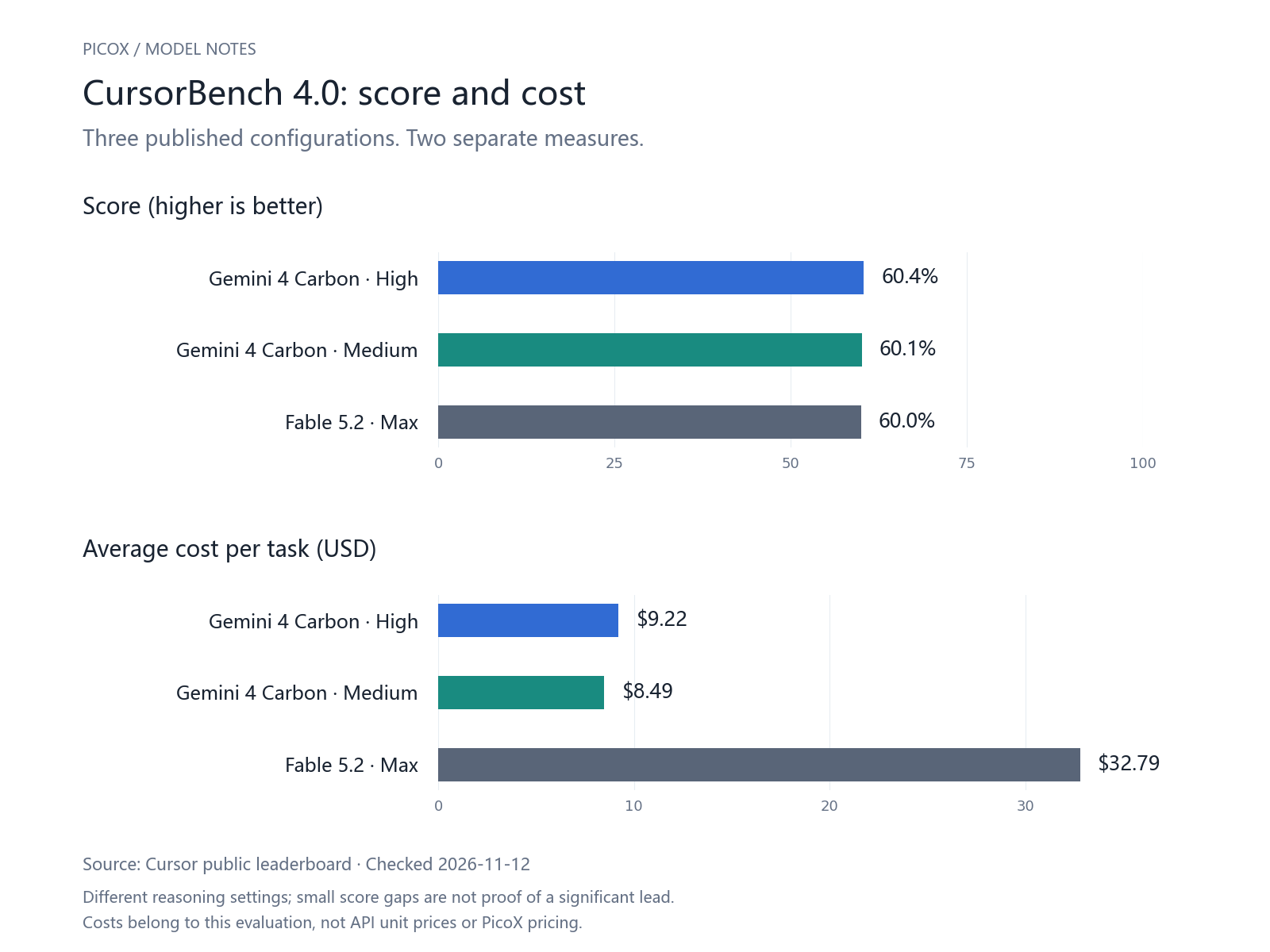
The small score gap does not establish a meaningful quality winner on its own. The cost gap is more interesting, though it still belongs to this evaluation setup. Your repository, tools and acceptance tests may produce a different result. I would use this comparison to choose candidates for a trial, then measure how many changes a reviewer actually accepts.
There is also a useful comparison with Argon. On Cognition's FrontierCode 2.0, Carbon scores 40.0%, versus Argon's 26.3%. This is a weighted rubric score, not the percentage of pull requests successfully completed or merged. It suggests progress on that evaluation without telling us how many of our own tickets it would solve.
Plotly's own data-analysis evaluation reports 42 out of 43 tasks solved, with a median of 93 seconds per question. It also describes a single run and cautions against treating differences of one or two tasks as decisive. That makes the result encouraging for analytical work, without turning it into a blanket guarantee about spreadsheets, charts or business data.
ARC Prize's results illustrate another complication. Carbon Medium reaches 63.9% on ARC-AGI-3 with the standard harness, versus 99.1% with a provider adapter. Those conditions belong beside the scores. Treating 99.1% as a general measure of intelligence would lose the most important detail in the comparison.
Reasoning settings also deserve attention. In Zapier's pre-release AutomationBench 1.0.6 evaluation, Medium scored 53.0% and High 53.9%, across 657 tasks per setting with a 50-step limit. An extra 0.9 percentage points may matter for a particular workload, but this result gives little reason to set every request to High by habit.
The million-token window needs a careful reading
Carbon shares its context budget across input, thinking and output. The default response allowance is 65,536 tokens; generating more requires Google's long-decode background execution or continuation mechanism, within the shared limit. The long-decode documentation also explains that thinking consumes the output allowance. A response can hit its limit before producing the answer you expected.
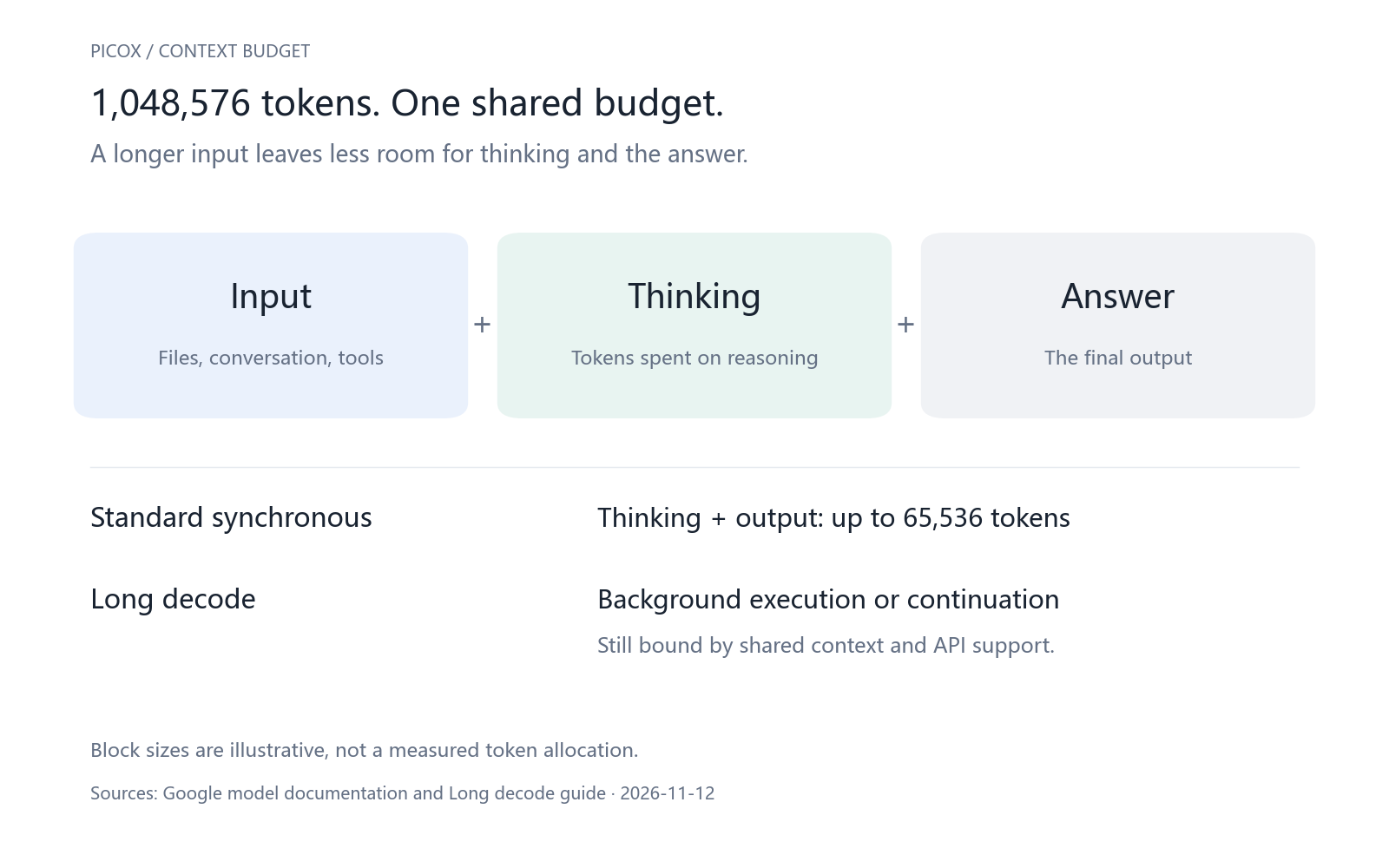
For an application developer, this changes the integration checklist. Check the finish reason, preserve continuation state where supported, and give users a way to understand a long-running task. An OpenAI-compatible model name alone does not establish support for Google's background or continuation features. Confirm those capabilities in the gateway and client you actually use.
What the API price means for a real budget
Google's Standard API prices have a dated introductory period. Prices below are USD per million tokens; output includes thinking.
| Billing item | Through November 30, 2026 | From December 1, 2026 |
|---|---|---|
| Input | $2.00 | $4.00 |
| Output, including thinking | $10.00 | $20.00 |
| Cached input | $0.10 | $0.20 |
Consider a hypothetical request with 100,000 uncached input tokens. At the introductory rate, 20,000 billed output tokens bring the total to $0.40; 80,000 accumulated through long decode or continuation bring it to $1.00. This is arithmetic, not a measured Carbon workload, and excludes separate tool charges. It shows why identical token prices can still produce very different task costs.
My budget question would be how much a completed, accepted task costs, including retries and review time. A cheap attempt that needs repeated repair can be expensive. A longer attempt is worthwhile only when its result saves enough work.
How I would evaluate it on a project
I would start with a small set of tasks whose outcomes are already understood: a previously fixed bug, a migration with known compatibility requirements, and a document question with a verifiable answer. Keep the tools, instructions and stopping conditions consistent. Record success, elapsed time, billed tokens and the amount of manual correction.
Start at Medium, then compare Low and High on the cases that need them. Ask for test evidence and source references, and inspect those references. Give the agent clear acceptance criteria and bounded permissions. That produces a more useful purchasing decision than a polished demo or a single leaderboard position.
Before integrating, check the PicoX model catalog for currently available models and providers, and the API documentation for integration details. Confirm Carbon's availability and interface capabilities against the route you plan to use.